


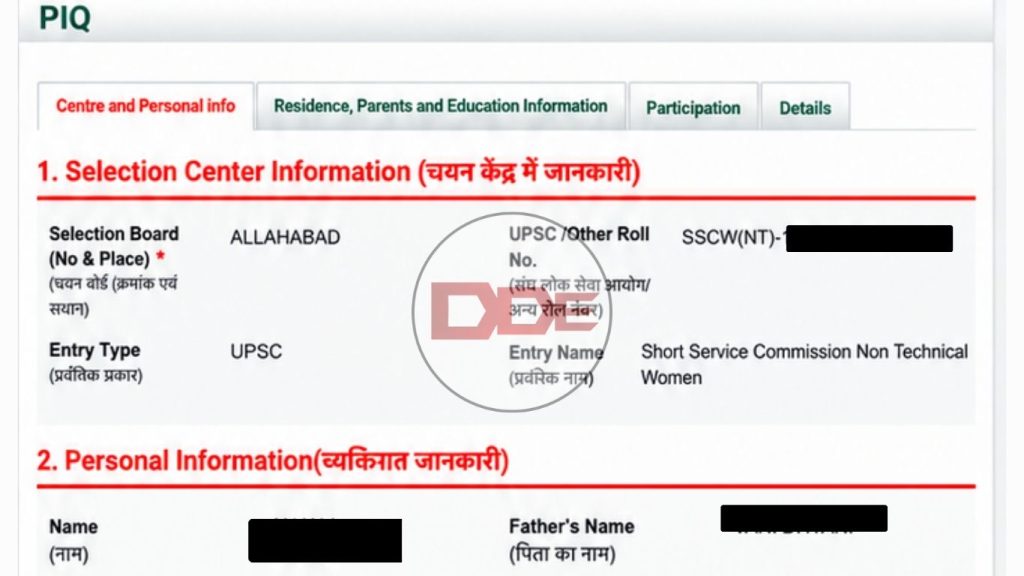
The most essential document in the Services Selection Board (SSB) interview is the PIQ form, which stands for Personal Information Questionnaire. With the OTA SSB dates out, many candidates are thinking how to fill online PIQ form. This document forms the basis of your assessment at SSB. Hence, if you are someone having similar doubts, here is a step-by-step guide with tips to fill the document that speaks volumes about your personality.
What is Online PIQ Form?
If you are a fresher or someone appearing for the Indian Army’s SSB for the first time, you might wonder what the online PIQ form really is. This is a common question among aspirants and before we tell you how to fill online PIQ form, here is what it means.
The PIQ form is a formal document that contains important details of your life and once you are screened in, you are required to fill it at the centre. However, when you appear for an army SSB, you have to carry your online PIQ with yourself. This is available on joinindianarmy.nic.in and should be duly filled and carried during the SSB interview.
Points To Remember
Before learning how to fill online PIQ form, you must keep a few points in your mind. Remember that this document will form the foundation of your assessment at SSB, hence, you better be sure by knowing the following points:
- You must have an account on joinindianarmy.nic.in and an upcoming SSB interview.
- To be eligible to fill the online PIQ you must first select your SSB centre and date on the platform.
- Avoid any of these mistakes while filling the online document.
- Only visit the official website mentioned above for filling the form.
By adhering to these points, you will realize that questions like, “How to fill online PIQ form”, will become a cakewalk for you. Let us now understand how this happens.
Steps On How To Fill Online PIQ Form
Finally, we are at the meat of this article. Here we answer how to fill online PIQ form in a step-by-step manner for you. Ensure that you have followed the four points mentioned above before beginning.
- Login to your account on joinindianarmy.nic.in with your username (registered email ID), password, and captcha code under the “Officer’s Entry” option.
- Now navigate to the “Centre and Date Selection Link” and select your SSB centre and date before you fill the form. You can find out how to select your SSB date for OTA here.
- Once you have selected the same, you will see the following message that confirms your date and centre selection:
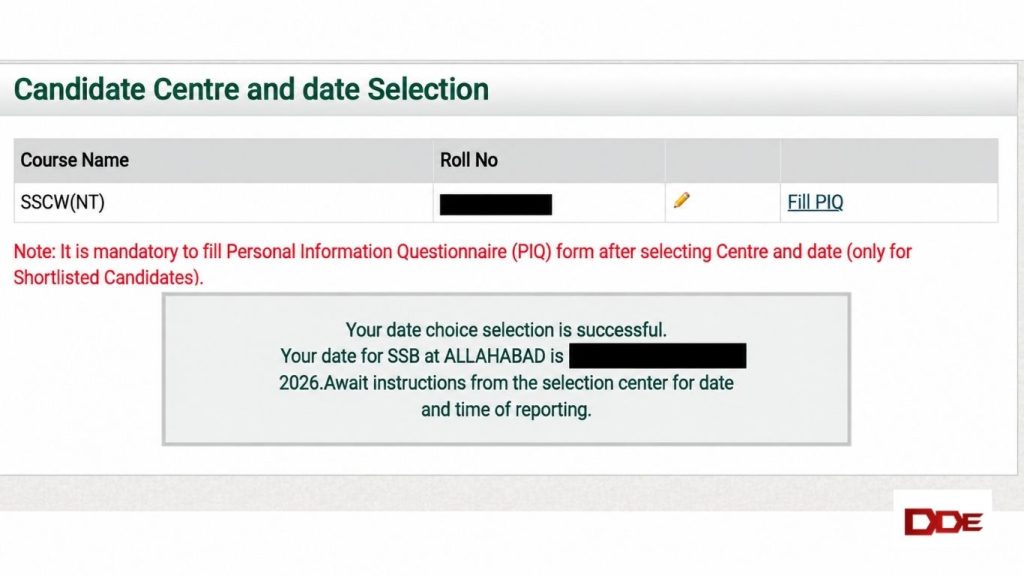
As you can see, the red font clearly mentions that you must mandatorily fill the PIQ form before reporting for your SSB. So, we tell you how to fill the online PIQ form now.
- On this page, click on “Fill PIQ” next to the pencil shown, and the website will redirect you to the page where you can fill your the document.
- Here, some information such as your name, your parents’ names, and your permanent address among others will be automatically filled by the system. Hence, these cannot be changed.
- Now, start filling the relevant information in the gaps provided to you. This is exactly how to fill online PIQ form. Once done, click on “Submit” and you are good to go!
You can easily download the PIQ form once you have submitted it by navigating to the “History of Application” under Dashboard and download your relevant document by clicking on “Print”. Congratulations! You have learnt how to fill online PIQ form and download it in six easy steps.

Frequently Asked Questions (FAQs)
Q. Can we edit the online PIQ form after submitting it?
A. Yes, this is allowed. Just follow the steps we have shared on how to fill online PIQ form and edit the parts that you want to. Once done, download the edited PIQ form again.
Q. I cannot add my AFSB/NSB entries to the online PIQ form. What should I do?
A. This is fine. The online PIQ form only allows you to add CGSB dates, and the system automatically fills your Army SSBs. This is not an area of concern. You can simply take what you have to the centre, and the JCOs will guide you on the next step.
Q. I cannot fill/download my online PIQ form. What should I do?
A. Before you panic, please ensure that you have selected your SSB centre and date as the facility is only available after this. If you are still unable to fill the online PIQ form, immediately contact the concerned centre and follow their instructions.